The Lead Who Couldn't Talk
What a keen lead with no time taught me about lead timers, plus a ten minute test you can run tomorrow.
In July I sat on a video call and watched a client’s ops lead order a family size margherita with olives from an AI phone line I’d wired into her sales board. She spelled out her name, gave a number, said that was all, and hung up. Then she refreshed the board to see what she’d get if a real customer had done the same.
The lead was there. The timer was running and the source was right. The details she’d given were missing, and so was the call transcript. She scored it on the spot:
“Okay, let’s give that a 50%. We got there.”
My logs could tell me whether each step ran. Only she could tell me whether she could make the call. Then she told me about a real lead from that morning who was super keen but couldn’t talk, and he showed me the gap went further than a missing transcript. This issue is about that gap, and about the ten minute test I’d now run with whoever calls your leads back.
In This Issue: the score, the lead who couldn’t talk, the morning it broke, and the Callback Test you can run tomorrow. Then five deeper tests for whoever builds the flow. About an 8 minute read.

An illustration of the July test. The timer and the source were right. The details weren’t there.
The Score
She was the person who rings every new lead back, so hers was the score that counted. The board had a speed to lead timer, a clock that starts when a lead lands and shows how long they’ve been waiting for a call. That part worked fine.
The transcript was the part she missed. She often listens to the call before she rings anyone, just to know how it went, and without it she’d have been dialling blind. Up to then I’d mostly watched the workflow through the code and the logs, where each step either runs or throws an error. Sitting next to her screen was different.
I started calling what we’d found half a lead: the alert is fast, and the person calling back still can’t make a good call. We tried the second way on the same call by ringing the number directly. She ordered another margherita, this time with anchovies, and the lead came through with none of the order on it.
Then she spotted her own email on the test lead and asked if it was there because it was linked to her phone number. My answer was “I think so,” then “maybe,” because I didn’t know yet, and I’d rather say that on a call than guess.
She still called the session a success. “We just need to refine it a little bit.” I told her it was really important to see it in live action, so we knew what to work with. The whole test took under ten minutes and found three gaps I hadn’t caught from the code.
Keen, but Not Now
Then she told me about a real lead from that same morning, and he turned out to be the harder problem. He’d come in by ringing the number, and when she called him back he was super keen but couldn’t talk right then.
So where does he go on the board? She had made contact, so by the rules I’d built the timer should stop. He hadn’t agreed to the next step, though, so there was nowhere honest to move him. The timer knew two states, contacted and not contacted, and he was a third.
What the board knew: contacted, so the timer stops and he’s off the clock.
What he actually was: contacted, still needing a call back, and back on a 24 hour clock.
“He’s never going to remember to call me,” she said, “but I will have to call him back.” The fix was her idea, and it was small. She suggested a stopwatch button on the card. Click it, the card records that you made contact but still need a follow up, and the timer starts again for 24 hours.
Her reasoning is a rule I wish more teams wrote down: if they’re hot and they’re in speed to lead, no matter what the next action should be, it shouldn’t be longer than 24 hours. We started with that blanket day and kept a custom timer as my fallback.
The Morning It Broke
We ran the same test the next day. Same order, same olives. She refreshed the board, and the lead wasn’t there.
“That’s weird,” I said. “This part was working yesterday.” I was in the middle of some upgrades and guessed that might be why, but honestly I didn’t know. She ran another test through the web demo and Slack picked it up straight away. By the end of the call she’d narrowed it down. One path was coming through, so it was the phone that wasn’t.
I think part of it was on me. I’d set the board to refresh on a schedule, about every 15 minutes, and speed to lead was sitting on that same schedule. Fifteen minutes is fine for a summary someone reads once a day. It’s a long wait for a column whose only job is to tell someone to pick up the phone.
So I told her I’d split them, with speed to lead updating immediately and everything else on the slower refresh. By the following Monday the progress board listed speed to lead as fixed. A couple of weeks later I paused a setup tool I was building, so the team could run that process by hand and show me where it broke before I automated more of it.
What It Taught Me
Most speed to lead advice is about the clock. Call within five minutes, alert the rep the second a form lands. I understand why, because it’s easy to measure and slow follow up really does lose deals. But in our first test the clock was the part that worked, and she still scored it 50%.
With the lead who couldn’t talk, the clock was wrong the other way. It treated him as done because she’d reached him, when he still needed a call back within a day. Both times, it took the person holding the phone to spot it.
So this is the idea I kept from those two days: let the person who dials score it. A lead workflow is done when the person who dials says they could make a good call from what’s on the card, and every lead they touch leaves with a next step and a time. Until they say so, a fast alert and a green run only tell you the plumbing works.
I’ve heard versions of that week on calls since, with other teams and other tools. People ask for context before the callback, one place where the lead actually lives, and a way to know when something broke, even when it looks fine. On one build an AI step kept reporting success while it was failing, and we only caught it in an end of day check after 11 quiet days.
The Callback Test
The ten minute version of that week needs one test lead and the person who rings your leads back. You don’t need to build anything first, and you don’t need anyone else in the room.
Send a Lead In the Way a Customer Would. Same channel, same kind of message, nothing tidied up for the test.
Let Them Open It Cold. Ask whether they could make a good call from this, right now, and what they’d want to know before dialling.
Ask for a Score Out of 100. Write down the number and everything they say is missing.
Ask the Awkward One. If this person said “keen, but call me later,” where would the lead go, and what would bring it back?
Run It Again Tomorrow. Same lead, same order. Ours came through on the first day and didn’t show up on the second.
Anything under 100 is your fix list, already sorted in the order your caller cares about. Ours started at 50.
Five Tests for the Builder
If you build the flow, these are the five tests I run before I call any enquiry workflow done. Each one checks what lands in the record, because that’s where ours went wrong. You can copy them as the Five Test Sheet. Every name and number in it is made up, and you should run it against a test CRM, never your live one.
Same Person Twice. Send the same customer in twice with the number written two ways, for example a WhatsApp message and a web form.
A Missing Field. No email, a phone with no country code, or an empty “what do you need” box.
A Burst That Hits the Rate Limit. Twenty submits inside one minute.
The Timeout That Actually Worked. Make the CRM call time out after the CRM has already saved the row.
The Ping Fails After the CRM Write. Break the Slack or WhatsApp alert after the record is saved.
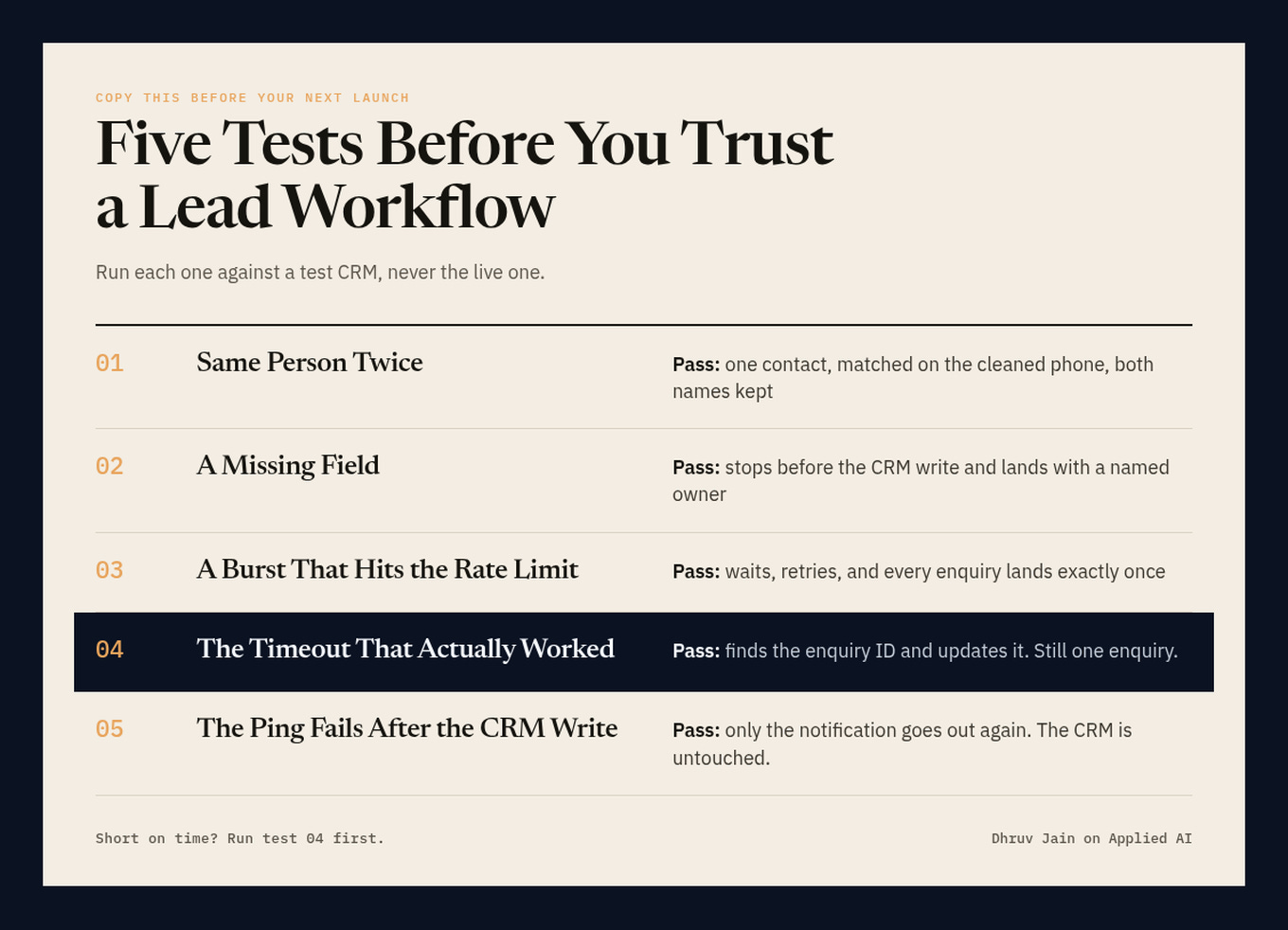
If you only have time for one, start with Test 04.
Test 4 is the one I’d run first. The run ends green, and the duplicate only shows up when someone opens the CRM, which is usually the person calling back.
Test 1 usually fails for a boring reason. A customer can message you on WhatsApp with the number in one format and type it into your form in another, and unless something cleans that before matching, you now have two contacts. Clean every number into one format first, and keep the customer and the enquiry as separate records so one person can ask about two things without overwriting either.
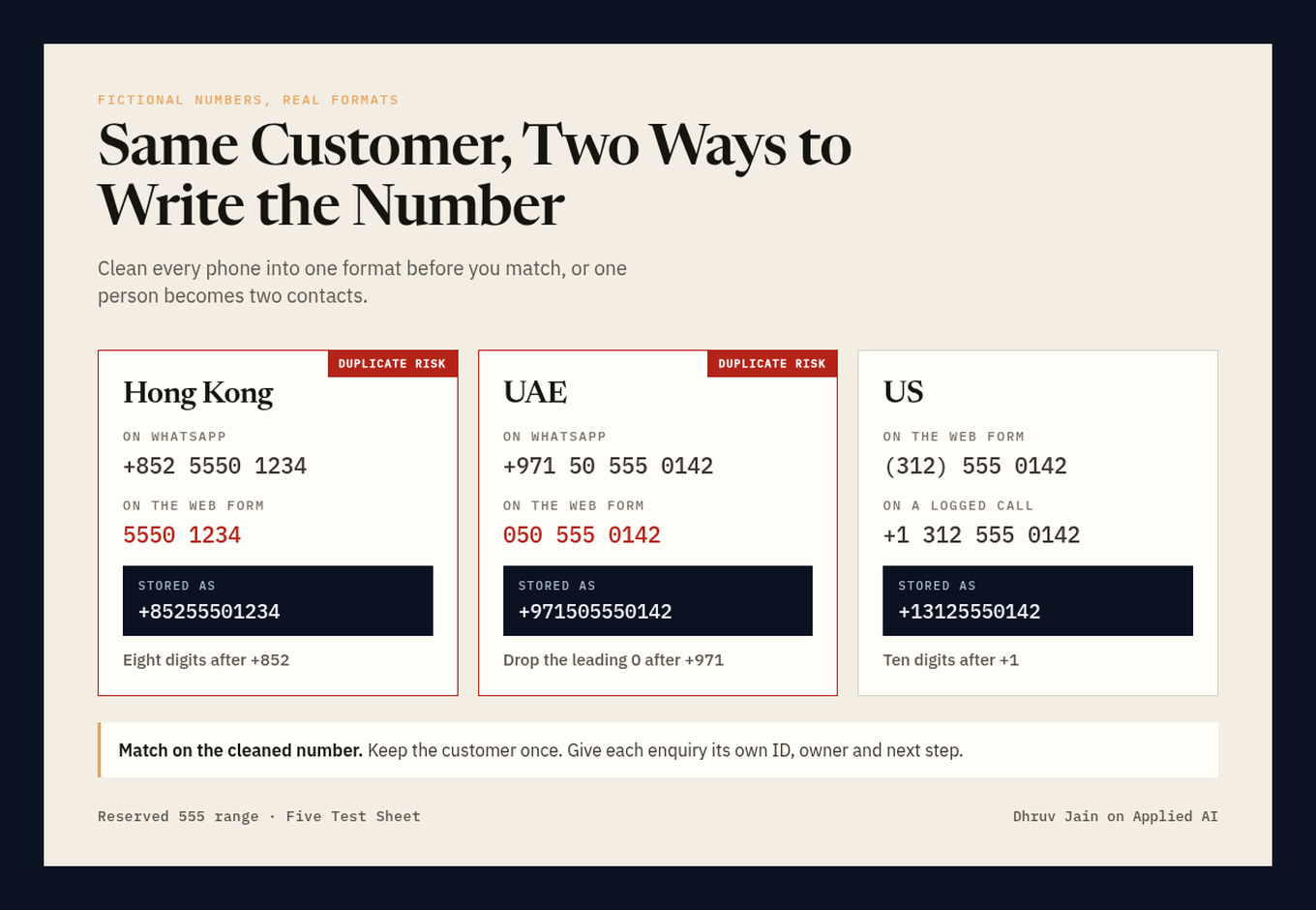
Without a cleaning step, one customer becomes two contacts.
If your leads come in on WhatsApp, test one more thing early. A test number can prove your qualification questions work, but it can’t prove your follow ups will arrive after 24 hours, because by then you can only send a pre-approved template. Put that template in your first test, not your last.
I’m still glad she ordered the pizza. A 50% from the person who dials taught me more than a green log ever has.
If a lead in your world is keen but can’t talk right now, reply or leave a comment and tell me where it goes in your pipeline. The name of the column is enough.
Dhruv
P.S. If you run the Callback Test this week, send me the score. Just the number is fine. If enough come in, I’ll share what I see across them in a later issue, with no names attached.
After You Finish

Take the Sheet. The Five Test Sheet is free to copy. New subscribers also get it in the welcome email.
Who’s Writing This. I’m Dhruv. I build AI workflows for B2B teams, then try to break them before their customers do. I write from Hong Kong about leads, follow ups, and the parts that broke.
Want a Second Pair of Eyes? I run Robossist. We pick one lead or ops workflow, find where it breaks, and fix the smallest useful piece first. You can book a 30 minute Workflow Bottleneck Review here: cal.com/dhruv-jain-vqeuqv/30min.
Find Me Elsewhere: X · LinkedIn · Robossist